
Objectifs du chapitre
- Define virtualization and know its fundamental principles.
- Know the evolution of virtualization and its history.
- Enumerate the types of virtualization (server, network, storage, application, desktop).
- Explain the different forms of virtualization.
- Identify the impacts of virtualization on information systems.
- Measure the benefits that virtualization brings.
1. Definition & principles
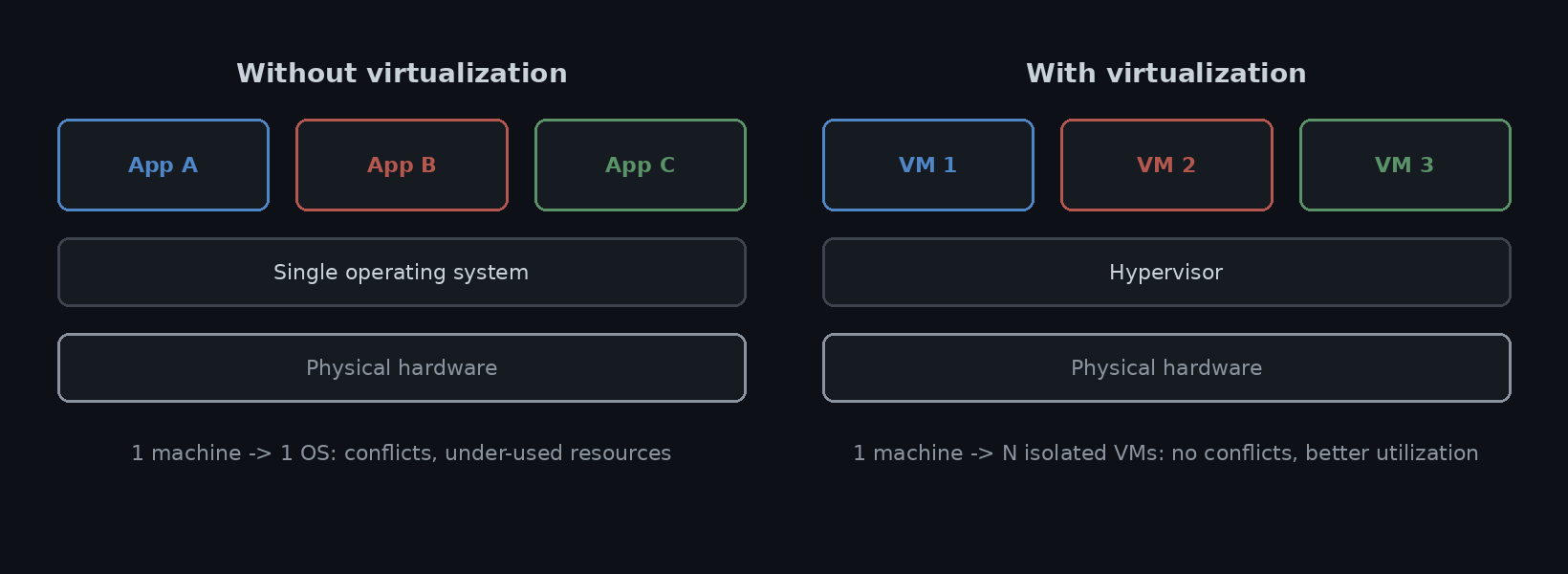
Virtualization is a set of hardware and/or software techniques that let a single physical machine (or a cluster) run several instances of operating systems or applications simultaneously and in isolation.
It rests on four principles: physical resources (CPU, memory, disk, network) are abstracted into standardised logical devices so the guest no longer depends on the underlying hardware; users and applications interact only with that abstract view while the hypervisor maps every request onto the real hardware; the host’s resources are shared among the VMs, scheduled and capped by the hypervisor so one VM cannot starve the others; and a VM behaves like a real computer, booting and running software exactly like a physical PC even though its disks, NICs and firmware are files and emulated devices.
1.1 Terminology: the actors
| Actor | Role |
|---|---|
| Host | The physical machine plus the software layer running directly on it. Owns every real resource and lends measured slices of them to the VMs. |
| Guest | An operating system, with its applications, installed inside a virtual machine. In most cases it runs unmodified and believes it controls a complete computer of its own. |
| Virtual machine (VM) | The isolated environment presented to a guest: virtual CPUs, RAM, disks and NICs. Its whole state is a set of files, easy to copy, move, snapshot or roll back. |
| Hypervisor / VMM | The thin software layer between the VMs and the hardware. |
1.2 The hypervisor (VMM)
The VMM (Virtual Machine Monitor) creates each VM, gives it virtual CPU, memory, disk and network, and arbitrates every access to the real machine: it traps the privileged and sensitive instructions a guest issues and emulates or forwards them safely, translates guest memory addresses to host memory, virtualizes the I/O devices, and schedules the vCPUs of all VMs onto the physical cores.
A good VMM offers fidelity (the guest runs as on real hardware), performance (most instructions run natively), safety (it keeps full control of the resources) and isolation (a fault stays contained), the criteria formalised by Popek & Goldberg.
Examples: data centre / cloud, VMware ESXi & vSphere, Microsoft Hyper-V, KVM (Linux), Xen, Proxmox VE. Desktop: VMware Workstation & Fusion, Oracle VirtualBox, Parallels Desktop, Microsoft Hyper-V on Windows.
1.3 The Popek & Goldberg criteria (1974)
G. Popek & R. Goldberg, “Formal Requirements for Virtualizable Third Generation Architectures”: a VMM must satisfy three properties.
| Criterion | What it means |
|---|---|
| Equivalence / fidelity | A program running under the VMM behaves exactly as it would on the bare machine, apart from differences in resource availability and timing. |
| Resource control / safety | The VMM keeps full control of the hardware resources at all times; a VM can neither seize them nor bypass the VMM. |
| Efficiency / performance | A statistically dominant fraction of instructions runs directly on the processor, with no VMM intervention. |
Emulation (for example simulating an ARM CPU on x86) meets equivalence but not efficiency: virtualization targets all three criteria at once.
1.4 Properties
| Property | What it means |
|---|---|
| Binary compatibility | Each VM believes it owns the real, available hardware; no change is needed to the OS or the applications (exception: paravirtualization, where the guest OS is modified). |
| Interposition | Every action of a VM goes through the hypervisor, which transforms instructions, memory and I/O; this enables transparent overcommit, encryption, compression and replication. |
| Isolation | Fault isolation (a faulty guest OS stays confined to its VM), software isolation (each VM has its own OS versions and libraries, so conflicts do not spread) and performance isolation (scheduling and quotas stop a heavily loaded VM degrading the others). Isolation is what makes consolidation acceptable. |
| Encapsulation | A VM’s entire state (dynamic and static memory, CPU and device registers) fits in a file, a system image, handled like any other file: moved, copied, deleted, archived, hence snapshots and clones. |
| Portability | Independence from the physical hardware: a VM can be moved from one host to another, even while running (live migration). Encapsulation plus portability is the basis of high availability and disaster recovery. |
2. History of virtualization
| Year | Milestone |
|---|---|
| 1967 | IBM System/360-67: CP/CMS, the first major virtual-memory system; the term “hypervisor” is born. |
| 1972 | IBM VM/370: commercial virtualization, several OSes on one mainframe. |
| 1974 | Popek & Goldberg: formal criteria for the virtualizability of an architecture. |
| 1980s-1990s | Virtualization fades: minicomputers, then cheap x86 servers (one machine per application). |
| 1999 | VMware: virtualization reaches x86 through binary translation. |
| 2003 | Xen: open-source paravirtualization, high performance. |
| 2005 | VT-x / AMD-V: hardware-assisted virtualization in the processors. |
| 2007 | KVM: hypervisor built into the Linux kernel. |
| 2013 | Docker: containers (OS-level virtualization) go mainstream. |
In the 1960s-1970s, machines were expensive and users many, so IBM built robust time-sharing on the System/360-67 with CP/CMS, later productised as VM/370: a control program handed each user a faithful copy of the hardware. Instead of time-slicing one shared operating system, every user was given a complete virtual machine and ran their own OS inside it, isolating users from each other and letting incompatible systems share a single mainframe.
In the 1990s, cheap PCs and the “one server per application” habit had side-lined virtualization. VMware (1998-99) brought it back to x86 using binary translation for the instructions the architecture could not virtualize cleanly, just as server sprawl was becoming unmanageable.
In the 2000s, virtualization software matured and gained hardware support (Intel VT-x, AMD-V, 2005-06), making hypervisors simpler and faster. The abstraction then spread to storage, networking and, with containers, the OS itself: the foundation of cloud computing.
3. Advantages & challenges
3.1 Advantages
| Advantage | Detail |
|---|---|
| Resource optimization & consolidation | One hypervisor packs many VMs onto a server, lifting utilization from ~10% to 70-80%, and the scheduler rebalances load across hosts. |
| Lower cost (CapEx & OpEx) | Fewer machines to buy, power, cool, cable and support; capacity is added in software instead of by purchase order. |
| Energy efficiency & sustainability | Consolidation cuts the number of running servers, so power draw, cooling, rack space and carbon footprint all fall. |
| Agility & fast provisioning | A new server is a template clone, created, resized or destroyed in minutes instead of the weeks a hardware order took. |
| Simplified operations | VMs and apps are files: backup, cloning, deployment and migration become copy operations. |
| Test & development | Snapshots and linked clones give disposable, reproducible environments; a bad change is rolled back in seconds. |
| Hardware independence | The VM is decoupled from the physical host, so hardware can be refreshed or replaced and workloads live-migrated with no reinstall. |
| Resilience & incident handling | Isolation contains a fault or compromise to one VM; live migration, HA clusters and snapshots speed recovery after an incident. |
3.2 Challenges and limits
| Challenge | Detail |
|---|---|
| Performance overhead | Privileged operations, memory translation and I/O all pass through the hypervisor; this “virtualization tax” plus noisy-neighbour contention costs a few to tens of percent under load. |
| Infrastructure complexity | Virtual and physical CPU, memory, storage, network and their mappings must all be monitored and capacity-planned; troubleshooting spans more layers. |
| VM sprawl | VMs are so easy to create that they multiply unchecked, wasting capacity and licences and leaving forgotten, unpatched machines as a liability. |
| Licensing complexity | Per-socket, per-core and per-VM models plus mobility restrictions make licence compliance hard to track once workloads move freely between hosts. |
| Single point of failure | Many workloads share one host, so its failure stops them all: HA clusters, anti-affinity rules and a tested DR plan become mandatory. |
| Storage & network contention | Consolidated I/O from many guests over shared links and datastores creates bottlenecks that need careful sizing and QoS. |
| New attack surface | The hypervisor is a high-value target: a VM escape or a management-plane flaw can expose every guest; inter-VM and side-channel attacks add risk. |
| Extra cost & skills | Hypervisor licences, more powerful hosts, shared storage and specialist staff and training are upfront investments before the savings appear. |
4. The forms of virtualization
Five domains: servers, desktop, applications, network, storage.
4.1 Server virtualization
Several virtual servers (VMs), each with its own OS, run on one physical machine through a hypervisor. Main goal: consolidation, replacing many under-used physical servers with a few heavily used hosts, which raises utilization from ~10% to 70-80%, gives fast provisioning and high availability (live migration, clusters) and isolation. Examples: VMware vSphere / ESXi, Microsoft Hyper-V, KVM / Proxmox, Xen.
| Technique | How it works |
|---|---|
| Full virtualization | The guest OS runs completely unmodified and is unaware that it is virtualized; the hypervisor traps every sensitive instruction and rewrites it on the fly (binary translation). Maximum compatibility, highest overhead. |
| Paravirtualization | The guest OS kernel is modified to cooperate with the hypervisor: it issues explicit “hypercalls” for privileged operations instead of being trapped. Very low overhead, but needs a ported kernel (the classic Xen model). |
| Hardware-assisted | The processor provides a dedicated virtualization mode (Intel VT-x, AMD-V); sensitive instructions run natively in a guest mode, the hypervisor only steps in on real exits. Simple and fast, today’s default (ESXi, Hyper-V, KVM). |
| OS-level | A single shared kernel is partitioned into many isolated user-space instances through namespaces and cgroups; with no guest OS, containers are tiny and start in milliseconds, but isolation is weaker than a VM (Docker, LXC, Podman). |
Resource sharing: the hypervisor gives each VM its own virtual CPU, memory, disk and network, then multiplexes those virtual resources onto the smaller pool of physical ones, over-committing where it is safe and enforcing limits so that no VM starves another. The scheduler multiplexes vCPUs onto physical cores (overcommit via the vCPU:pCPU ratio); memory uses dynamic allocation, ballooning, page sharing and compression, with swap as the safety net; each VM sees virtual disks (.vmdk / .vhdx / .qcow2) placed on datastores with thin provisioning and snapshots; a virtual switch (vSwitch) connects the VMs’ vNICs to the host’s physical NICs, with VLANs and port groups segmenting the traffic.
4.2 Desktop virtualization (VDI)
Separates the desktop environment and its applications from the physical device used to access it. VMs (each with an OS) run on a server (hypervisor); at logon the user connects to one of them, and display and audio are streamed over the network through a remote display protocol (RDP, ICA, PCoIP, Blast Extreme, SPICE, browser access). Endpoints become interchangeable (thin client, zero client, laptop, tablet, BYOD); management, storage, patching and security move to the data center. Challenges: time-consuming endpoint management, running costs, service levels (SLAs), security and compliance.
| Model | How it works | Isolation / personalization | Cost / density |
|---|---|---|---|
| VDI, persistent | A dedicated VM is kept for each user between sessions. | Full: user keeps installed apps and settings. | High storage, 1 VM per user. |
| VDI, non-persistent | A fresh VM is cloned from a master image and reset at logoff. | Pooled: profile tools restore identity and data. | Lower: one shared image. |
| Session-based (RDSH) | Many users share one Windows Server OS, one session each. | Weakest: limited by app compatibility. | Lowest cost, highest density. |
| DaaS | VDI or sessions hosted and operated in the cloud (AVD, Windows 365, Amazon WorkSpaces). | Same as the underlying model. | OpEx subscription, no on-prem farm. |
| Client-side | Desktop or app image runs on the endpoint itself (Type-2, streaming). | Local: can work offline. | Uses the endpoint’s own resources. |
Architecture: a connection broker authenticates the user and hands back a desktop from a pool; a golden image is cloned automatically into many desktops (linked or instant clones); profile management tools (FSLogix, roaming profiles) re-attach the user’s identity and data to whichever VM they land on; a remote display protocol plus a gateway carries only screen, audio and input securely; storage IOPS and simultaneous boot / login storms dominate the sizing.
4.3 Application / software virtualization
Packages the application and its system runtime context into a sandboxed environment (a silo), so the application runs isolated with no installation and no local dependencies. This cuts testing costs and packaging time, eases OS migration and simplifies delivery. Examples: Microsoft App-V; Citrix XenApp (remote sessions and applications over the HDX protocol).
Packaging works in three steps: capture (sequencing) on a clean reference machine records the entire installation (files, registry keys, services, shortcuts) into one virtual package; at run time a lightweight runtime on the client intercepts the application’s file and registry calls and serves them from inside the package instead of from Windows, so the app behaves as if installed while the OS stays untouched; the package is then delivered in full, streamed on demand, or attached as a disk at logon (app layering). Updating means publishing a new package, uninstalling means deleting it.
| Aspect | Application sandbox | Container |
|---|---|---|
| Isolation boundary | File-system and registry redirection inside one running OS. | Kernel namespaces + cgroups; the container brings its own user space. |
| Shared with the host | The whole OS: kernel and all system libraries. | Only the OS kernel. |
| What ships in the unit | The app plus its DLLs and settings, as a redirected overlay. | The app plus a full user space, as image layers. |
| Portability | Tied to the same Windows family and version. | Any host with a compatible kernel and a container runtime. |
| Typical use | Desktop apps: conflicting versions, legacy apps, VDI delivery. | Server workloads: microservices, CI/CD, Kubernetes. |
| Tools | Microsoft App-V / MSIX, VMware ThinApp, Cameyo. | Docker, containerd, Podman, LXC, Windows containers. |
4.4 Network virtualization
Traditional networks are configured box by box with vendor CLIs, so a single change means touching many switches and routers. Network virtualization shares one physical fabric (bandwidth, ports, forwarding capacity) among several isolated virtual networks, each managed as a logical service with its own addressing, policy and lifecycle. Aggregation combines several physical networks into one logical network; partitioning slices one physical network into many isolated virtual ones (VLANs, VRFs, overlays). External virtual networks span physical devices; internal ones live inside one host, wiring its VMs together through a software switch.
| Technique | Scope / layer | What it does |
|---|---|---|
| VLAN | L2 switching | Segments a single switched LAN into broadcast domains (802.1Q tag, VLAN ID 1-4094). |
| VPN / SD-WAN | L3 / WAN | Private, encrypted connectivity (IPsec, WireGuard, TLS) over a shared or public IP network. |
| Overlay (VXLAN, Geneve) | L2 over L3 | Tunnels that carry virtual L2 segments across a routed fabric. |
| SDN | Control plane | Centralized, programmable control decoupled from forwarding. |
| NFV | Network functions | Firewalls, routers, load balancers, mobile core run as software. |
| Cloud VPC / Kubernetes CNI | Consumption | Virtual networks created and managed through an API. |
VXLAN (RFC 7348) wraps an Ethernet frame in UDP, MAC-in-UDP, so an L2 segment can stretch across a routed L3 fabric. A 24-bit VXLAN Network Identifier (VNI) gives about 16 million segments versus 4094 VLANs. A VTEP (VXLAN Tunnel End Point), on the hypervisor or the ToR switch, performs the encapsulation and decapsulation: the source VTEP wraps the original frame in a VXLAN header (VNI), inside UDP (port 4789), inside an outer IP header, the underlay routes that packet as ordinary IP, and the destination VTEP strips the headers and hands the frame to the target VM.
SDN separates the control plane (the logic that decides where traffic goes) from the data plane (the hardware that forwards it): a logically centralized controller keeps a network-wide view and exposes it through northbound APIs to apps and orchestration, while southbound protocols (OpenFlow, P4, gNMI/gNOI) push the rules down to programmable switches and routers.
NFV takes network functions that used to run on dedicated appliances (firewall, load balancer, router, NAT, mobile packet core) and runs them as software (VNFs) on standard x86 servers. ETSI organizes it into three blocks: NFVI (the virtualized compute, storage and network resources plus the hypervisor or container layer, in effect a telco cloud), VNF (one network function packaged as VMs or containers, chained into an end-to-end service), and MANO (management and orchestration: the NFV-Orchestrator, the VNF-Manager and the VIM).
In the cloud and in Kubernetes these combine: a cloud VPC lets a tenant define subnets, route tables and gateways through an API; micro-segmentation / zero-trust gives every workload its own default-deny firewall policy; Kubernetes networking gives every pod its own IP through a CNI plugin (Calico, Cilium, Antrea) enforcing NetworkPolicy, often over VXLAN or eBPF; a service mesh (Istio, Linkerd) adds Layer-7 routing, automatic mutual TLS and traffic control between services.
4.5 Storage virtualization
| Architecture | Access level | Connectivity | Sharing |
|---|---|---|---|
| DAS | Block | Direct cable (SAS / SATA) | Single server only. |
| NAS | File | LAN (Ethernet), NFS / SMB | Many heterogeneous clients. |
| SAN | Block | Dedicated fabric (FC / iSCSI) | Many hosts, block-level, native HA. |
Storage virtualization hides the complexity of the physical storage resources and presents a logical view to the compute systems: a virtualization layer abstracts device identity and builds a storage pool from heterogeneous arrays, and virtual volumes are carved from the pool and assigned to servers, which use them like physical storage without being aware of the mapping. A resource mapping table records which physical blocks back each virtual volume, so editing an entry moves or resizes storage with no host impact.
| Mechanism | What it does |
|---|---|
| Thin / virtual provisioning | Capacity is allocated on first write, not up front; the pool can advertise more space than it physically has. |
| Automated tiering | Hot data moves to flash, cold data to cheaper disk or cloud, at block granularity on an access-frequency schedule. |
| Deduplication & compression | Identical or compressible data is stored only once, inline or post-process (roughly 2-5x on VDI and backups). |
| Snapshots, clones, replication | Point-in-time and remote copies for backup and DR; snapshots are not backups, as they share blocks with the source. |
| Multipathing | Several physical paths between host and storage; MPIO fails over on link loss and load-balances. |
The virtualization layer can run host-based (in the host OS or hypervisor, pooling only that host’s capacity: Linux LVM, VMware vSAN), network-based (an in-band appliance in the SAN data path presenting every back-end array as one pool: IBM SVC, DataCore, Dell EMC VPLEX), or array-based (one controller array virtualizes LUNs from other arrays behind it: NetApp FlexArray, Hitachi VSP). Modern forms move the same ideas onto commodity servers: software-defined storage (SDS, such as Ceph or MinIO) turns a control plane plus commodity drives into a pool; hyperconverged infrastructure (HCI, such as Nutanix or vSAN) has every node contribute CPU, RAM and local flash to one shared, mirrored datastore; object and cloud storage (Amazon S3, Azure Blob) addresses immutable objects by key over the S3 API, erasure-coded across nodes, for backups, archives and data lakes rather than low-latency transactional I/O.